
Salesforce Sales Cloud + ERP Integration for Manufacturers: An Architecture Guide for CIOs and IT Directors

Updated: May 19
Most manufacturing CIOs have already won the back-office battle.
The ERP runs production, inventory, finance, and procurement well enough that the board stops asking about it. The front office is a different story. Pipeline lives in spreadsheets, distributor coverage is invisible, quote turnaround depends on which engineer is in town that week, and forecast accuracy is whatever Sales tells Finance the day before commit.
For IT leadership, this is not a sales problem. It is an architecture problem: the system of record for revenue does not exist, so every cross-functional question — credit risk on a new account, lead time impact on a strategic deal, margin erosion on a configured product — turns into a forensic exercise across email, Excel, and the ERP.
Salesforce Sales Cloud, integrated properly with the ERP, is the standard way to close that gap. This guide is written for the CIO or IT Director scoping that integration. It covers the architectural decisions that determine whether the project delivers in two quarters or becomes a three-year cleanup.
Why extending the ERP is the wrong default
The cheapest-looking option is almost always to extend the ERP. The license is already paid for, the IT team knows it, and "one system" sounds clean on a slide.
In practice, extending an ERP into front-office territory fails for three structural reasons.
Upgrade fragility. Every customization on top of an ERP becomes a regression risk at the next release. Sales workflow changes faster than finance workflow, which means the ERP gets touched constantly — and each touch is a test cycle.
Adoption ceiling. ERPs are designed for transactional accuracy, not for the messy, mobile, conversational work of selling. Sales teams route around them. Once that happens, the data you spent money to centralize stops arriving.
Ecosystem cost. Marketing automation, CPQ, partner portals, e-signature, and the emerging layer of AI assistants all integrate to Salesforce as a default. Replicating that surface area on top of an ERP is a permanent custom development line item.
The right architectural pattern is to let the ERP do what it does best — financial control, inventory, production execution — and put Sales Cloud in front of it as the system of engagement. The question then becomes how to connect the two.
The four data flows that define the integration
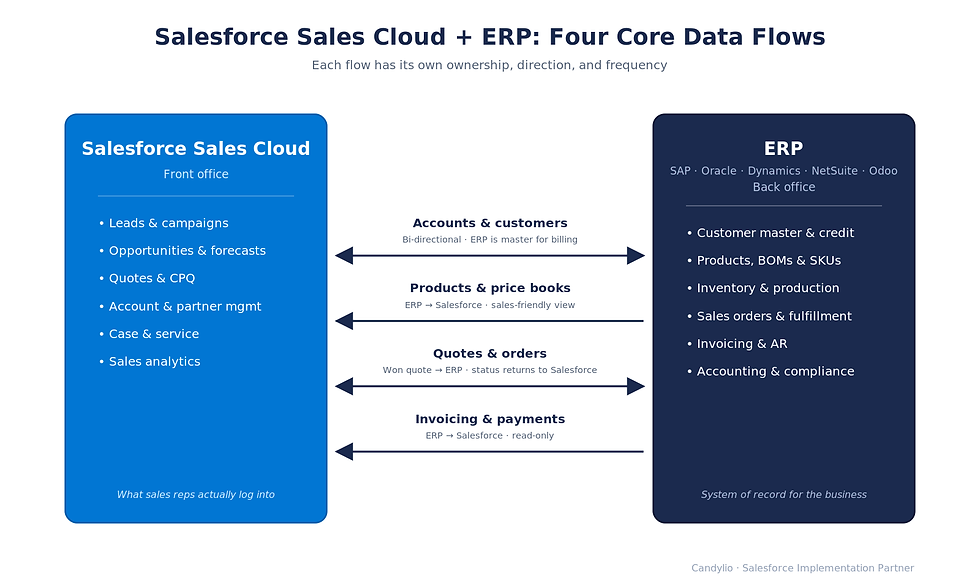
A working Sales Cloud + ERP integration is not a single sync. It is four distinct data flows, and each needs explicit ownership rules before any code is written.
Accounts and customers. Master data is anchored in the ERP because billing, credit terms, and tax setup live there. New accounts typically originate in Salesforce as leads. Bi-directional sync is required, with field-level ownership defined per attribute — never "both systems can edit everything."
Products and price books. SKUs, BOMs, and cost data live in the ERP. Salesforce needs a sales-facing projection: what reps can quote, at what price, under what discount authority, with what lead time. For manufacturers with configurable products, MOQs, and customer-specific price lists, this is the single largest under-scoped area in most projects.
Quotes and orders. Salesforce — or Salesforce CPQ — generates the quote. On close-won, the order flows to the ERP for fulfillment and procurement. Order status, ship dates, and lot information flow back so that account managers and customer service see the same reality the ERP sees.
Invoicing and credit status. Read-only sync from ERP to Salesforce. Commercial teams see what is billed, outstanding, and at credit risk, without being given write access to the financial system.
If any of these four flows is treated as an afterthought, it becomes the source of the post-launch fire that erodes adoption.
Three integration patterns — and how to choose honestly
There are three integration patterns. Picking the right one depends less on company size than on the variables IT actually has to live with: ERP customization depth, number of legal entities, integration team capacity, and total cost of ownership over a five-year horizon.
Native or AppExchange connectors
Fastest path for ERPs with mature Salesforce connectors — NetSuite, Dynamics 365, Odoo. Limited customization surface, but low cost to stand up and to maintain. A reasonable default for organizations with a single ERP instance, standard processes, and a small IT team. Worth noting: native connectors often cover 80% of the use case at 20% of the cost, and the remaining 20% can be handled with targeted custom work.
iPaaS — MuleSoft, Boomi, Workato
The right pattern when integration complexity comes from elsewhere — multiple back-office systems, multiple legal entities, non-standard ERP customizations, or a longer roadmap that includes adjacent systems (PLM, WMS, e-commerce). Higher initial investment. Lower long-term maintenance cost only if the iPaaS team is staffed and disciplined. An under-resourced iPaaS deployment is worse than a well-run point-to-point.
Point-to-point custom APIs
Appropriate for narrow, stable use cases, or as a tactical bridge while a longer-term architecture is being built. Not appropriate as a default — technical debt compounds, and every ERP upgrade becomes a regression test cycle.
The right answer is rarely obvious from headcount alone. We have seen 80-user manufacturers correctly land on iPaaS because they had three legal entities and an active M&A roadmap, and we have seen 600-user organizations correctly land on a native connector because their processes were standardized and their IT team was small. Choose for the variables that actually drive cost over five years.
Common failure modes
Three deployment patterns cover almost every manufacturer we've worked with. Choosing the right one upfront avoids the most expensive mistakes.
Native or AppExchange connectors. The fastest path for ERPs with mature Salesforce connectors (NetSuite, Dynamics 365, Odoo). Limited customization, but cheapest to stand up and maintain.
iPaaS — MuleSoft, Boomi, or Workato. The right answer for medium-to-large manufacturers with multiple systems, multiple legal entities, or non-standard ERP customizations. Higher initial investment, dramatically lower long-term maintenance cost.
Point-to-point custom APIs. Appropriate only for narrow, stable use cases. Avoid as a default architecture — technical debt compounds quickly and every ERP upgrade becomes a regression risk.
Choosing wrong here is the most common multi-million-dollar mistake in this space. The pattern that fits a 50-user discrete manufacturer will collapse under a 500-user OEM with three legal entities and cross-border invoicing.
Common failure modes — and how to avoid them
Integration projects fail for a small set of repeatable reasons. None of them are technical surprises — they are scoping decisions made too late.
Master data not cleaned before go-live
Duplicate accounts, inconsistent SKU codes, and orphaned price records pollute Salesforce within weeks of launch and become significantly more expensive to fix once reports and dashboards depend on them.
Sales process not redesigned
Mapping a broken process into a new system produces a faster broken process. Integration is the moment to fix workflow, not freeze it.
Field-level ownership undefined
When both systems can edit the same field, "last write wins" becomes silent data corruption. Every attribute needs an explicit system of record before code is written.
Multi-entity and multi-currency scoped late
Manufacturers selling across regions need this designed from day one. Retrofitting it is painful and expensive, and is one of the most common reasons a Phase 1 success becomes a Phase 2 rebuild.
No change management for sales
Adoption is the project. Configuration is the easy part. A technically perfect integration that sales does not use produces no pipeline data.
How Candylio approaches this work
Candylio is a Salesforce implementation partner with a manufacturing focus. We are deliberate about how we describe this offering: we are extending our Salesforce practice into Sales Cloud + ERP integration for manufacturers and OEMs, and we are open about the fact that this is a focused, hands-on engagement model rather than a productized service with pre-built accelerators for every ERP.
Our approach reflects that posture.

Discovery and process mapping
We document the current sales-to-cash process end-to-end across both systems - including the spreadsheets and email workarounds - before recommending a target architecture. The output is a written current-state-to-target-state document, not a slide.
Solution design before code
Data model, integration pattern, field-level ownership, security model, and rollback plan. All signed off before development starts. CIOs reading this will recognize that this is non-negotiable for any system that will own revenue data.
Build in two-week sprints
Working demos at the end of each sprint. The first demo is usually inside week three. Surprises surface early, while they are still cheap to fix.
UAT on cleansed production data
Migration scripts are rehearsed at least twice before cutover. Go-live is never the first time a script runs against real data.
Hyper-care with measured adoption
A defined post-launch period during which issues are triaged within an SLA and adoption metrics — logins, opportunities created, fields populated — are reported weekly. Adoption is measured, not assumed.
The approach is intentionally ERP-agnostic. We do not have proprietary accelerators for SAP, NetSuite, or Dynamics 365, and we will not pretend otherwise. What we bring is a disciplined integration methodology, Salesforce platform depth, and a manufacturing-focused process lens.
Book a 30-minute architecture review
If you are evaluating a Salesforce Sales Cloud + ERP integration, we offer a 30-minute architecture review for IT and engineering leadership. In that session we will look at your current systems landscape, identify the highest-risk integration points, and give you a candid view of the deployment pattern most likely to fit — including whether Candylio is the right partner for the work.
No deck, no sales pitch. A working session.
Book a 30-minute architecture review with Candylio's Salesforce team.


Comments